What is AWS EC2?
AWS EC2, (Elastic Compute Cloud), provide secure & sizable compute capacity in the cloud.
It is a fundamental IaaS service that allows customers to run applications on virtual servers without investing into physical hardware.
Configuration options
When configuring an EC2 instance, the following are possible to specify:
- The operating system;
- How much compute power & cores (CPU) the machine will have;
- How much random access memory (RAM) the machine will have;
- How storage space the machine will have:
- Network attached (EBS & EFS);
- Hardware (EC2 Instance Store).
- The network card:
- Speed & Public IP address.
- The firewall rules:
- Note: By default, all inbound traffic is blocked & all outbound traffic is allowed.
- Bootstrap script (configuration at first launch). (EC2 User Data).
- Note: User Data is executed only once, in the entire lifecycle of an EC2 instance.
Instance types
EC2 instances come in families, each optimized for different workloads:
General Purpose
- Offers a balanced mix of compute, memory & networking;
- Suitable for most applications like web servers, development environments and small databases.
Compute Optimized
- Offers high-demand processors for compute-intensive tasks;
- Best for batch processing, gaming, media transcoding, machine learning or high performance web servers.
Memory Optimized
- Offers large memory-to-CPU ratio;
- Ideal for in-memory databases, big data processing, real time analytics or high performance caching.
Storage Optimized
- Offers high, sequential and random I/O throughput and low latency storage;
- Best for large transactional databases, big data processing, real time analytics or high performance caching.
Accelerated Computing
- Uses GPUs or FPGAs to speed up specialized tasks;
- Suitable for machine learning, AI inference/training, graphics rendering or scientific simulations.
Pricing models
AWS offers different pricing models for EC2 instances to accommodate different usage needs and cost optimization strategies:
EC2 on Demand
- Pay for what you use model, billed per second;
- Highest cost but no upfront payment;
- No long term commitment;
- Recommended for short term and uninterrupted workloads.
EC2 Reserved Instances
- Up to 72% discount compared to the EC2 on Demand model;
- Reservation of specific attributes, (Instance type, region, etc.), with either:
- 1 year (+ discount);
- 3 years (+++ discount).
- Possibility to pay:
- All upfront (+++);
- Partially upfront (++);
- No upfront (+)
- Ideal for steady state usage applications (e.g. databases).
EC2 Savings Plans
- Up to 70% discount based on long term usage;
- Commit to a certain type of usage ($10/h for 1 or 3 years);
- Usage beyond the EC2 Savings Plan is billed at the On Demand model price;
- Locked to a specific instance family & AWS region, (e.g. M5 in us-east-1).
EC2 Spot Instances
- Up to 90% discount compared to the On Demand model;
- Can be lost at any point of time if max price is less than the current spot price;
- Is the most cost effective instance in AWS.
- Useful for workloads that are resilient to failure.
EC2 Dedicated Hosts
- Fully dedicated physical server with EC2 instance capacity;
- Allows addressing of compliance requirements and usage of existing server-bound software licenses, (per-socket, per-VM licenses);
- Is the most expensive option in AWS;
- Recommended for:
- Companies with strong regulatory or compliance needs;
- Software that has complicated licensing model, (e.g. BYOL - Bring Your Own License).
EC2 Dedicated Instances
- Instances that run on hardware dedicated to the user;
- May share hardware with other instances in the same account;
- No control over instance placement. (Can move hardware after Stop/Start).
EC2 Capacity Reservations
- Reserve On Demand model instances capacity in a specific AZ for any duration;
- Access at all time to the EC2 capacity when needed;
- No time commitment, no billing discounts;
- Charged at the On Demand model rate whether the instance is running or not.
EC2 storage types
EC2 supports multiple storage types that fit different needs:
EBS Volumes
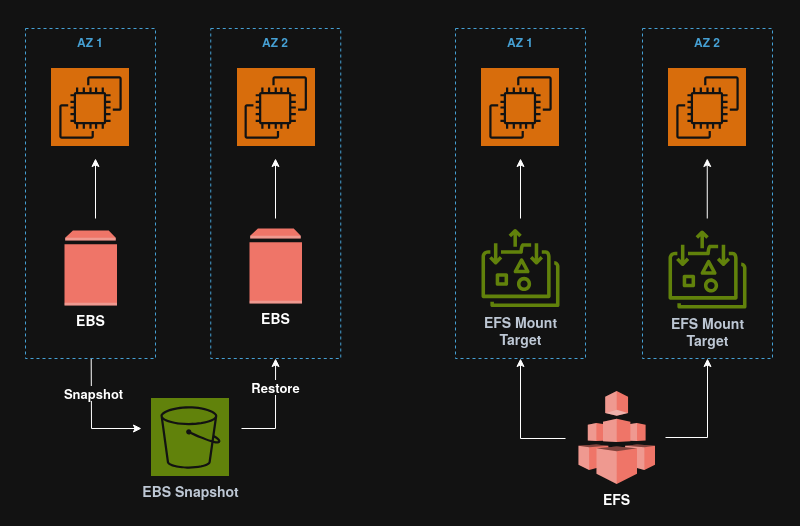
An EBS (Elastic Block Store) volume, is a network drive that can be attached to instances while they are running.
Note: EBS volumes can be mounted to a single instance at a time and are bound to specific AZs.
Here is an analogy
Think of EBS volumes as network USB sticks.
EBS Snapshots
EBS Snapshots are backups of EBS volumes at a point in time. They can be copied across regions.
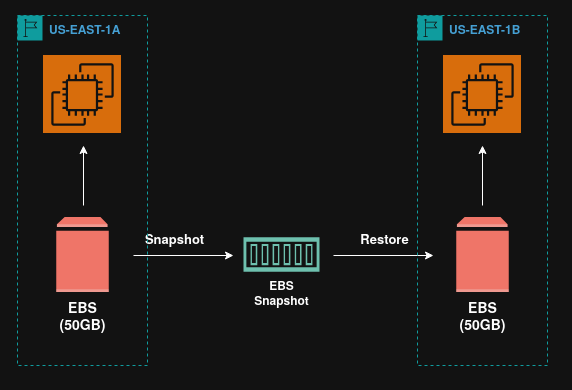
Performing snapshots
In order to perform a snapshot, it is not required to detach the volume, but it is recommended to do so.
EBS Snapshot Archive
The EBS Snapshot Archive is a feature that allows a snapshot to be moved to another storage tier, (the archive tier), which is 75% cheaper.
However, archived snapshots take between 24h to 72h to be restored.
EC2 Instance Store
While EBS Volumes have good performance, the fact that they are network drives limits their potential.
If high performance is needed, the EC2 Instance Store provides hardware disks with better I/O performance.
They are suited for buffers, cache, scratch data and temporary content.
EFS Volumes
An EFS (Elastic File System) volume is a managed NFS, (Network File System), that can be mounted on 100s of EC2.
EFS volumes are highly available, scalable and are about 3x more expensive that EBS Volumes.
EFS Infrequent Access (EFS-IA)
EFS-IA is a storage class that is cost optimized for files not accessed every day. It can have up to 92% lower cost compared to the EFS Standard class.
If EFS-IA is enabled with a lifecycle policy, then EFS will automatically move files to EFS-IA based on the last time they were accessed.
Note: From an application perspective, EFS-IA is transparent and should have no impact on it’s performance.
Amazon FSx
Amazon FSx is a fully managed service to get 3rd party high performance file systems on AWS.
FSx for Windows File Server
FSx for Windows File Server is a fully managed highly reliable and scalable Windows native shared file system.
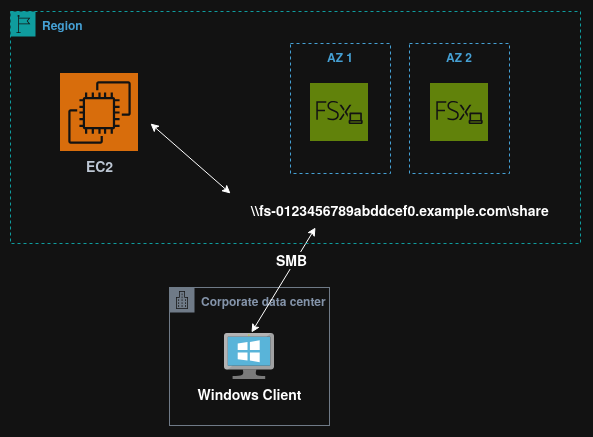
FSx for Windows File Server supports the SMB & NTFS protocols.
Note: FSx for Windows File Server is integrated with Microsoft Active Directory and can be accesses from AWS or on-prem infrastructure.
FSx for Lustre
FSx for Lustre is a fully managed, high performance, scalable file storage for High Performance Computing (HPC).
It scales up to 100 GB/s, millions of IOPS, sub-ms latencies and is used for machine learning, analytics video processing, financial modeling, etc.
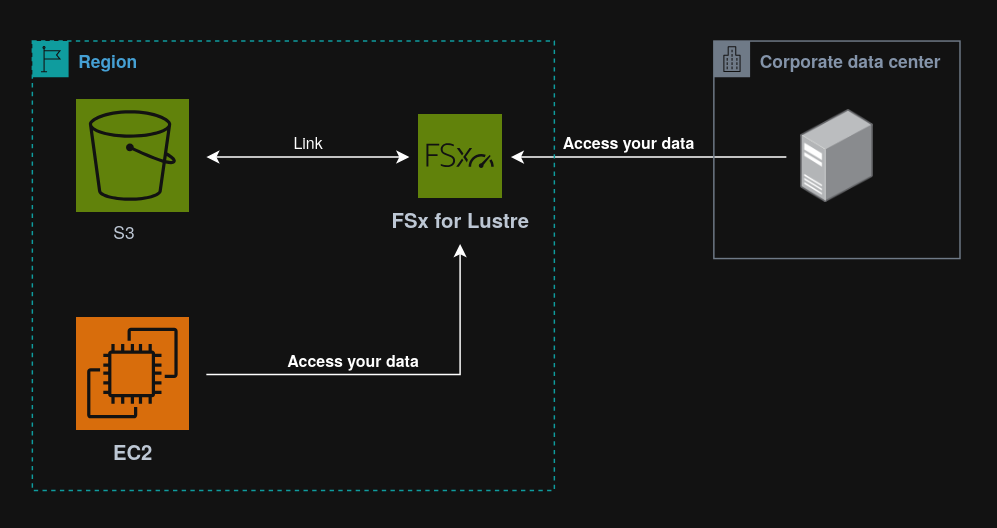
Note: The name “Lustre” is derived from “Linux” & “Cluster”.
EC2 AMIs
An AMI, (Amazon Machine Image), is a customization of an EC2 instance, that can contain custom software, configurations, monitoring, etc.
Since all software is pre-packaged, the boot & configuration times are faster.
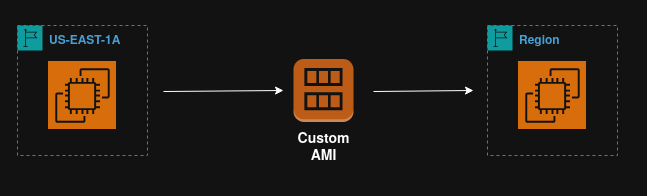
Note: AMIs are built for specific regions but can be copied across regions.
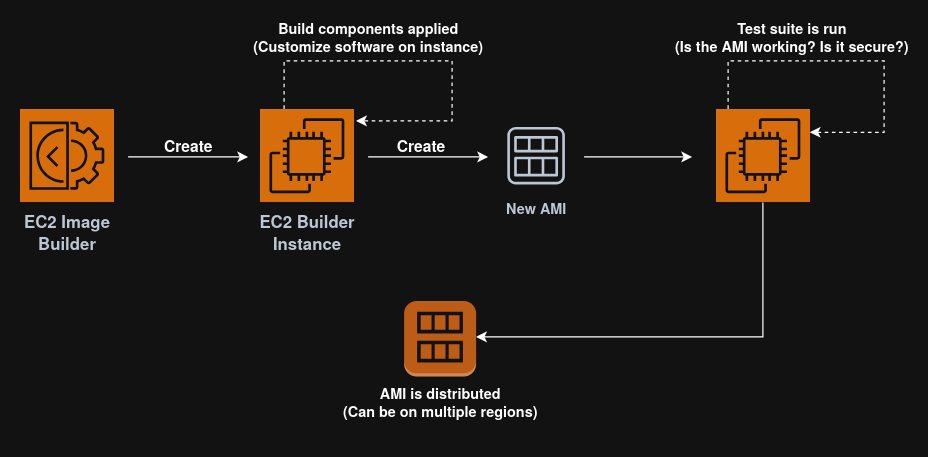
EC2 Image Builder
The EC2 Image Builder is a free service used to automate the creation of virtual machines ir container images.
It can be run on a schedule and it automates the creation, maintenance and validation of AMIs.